

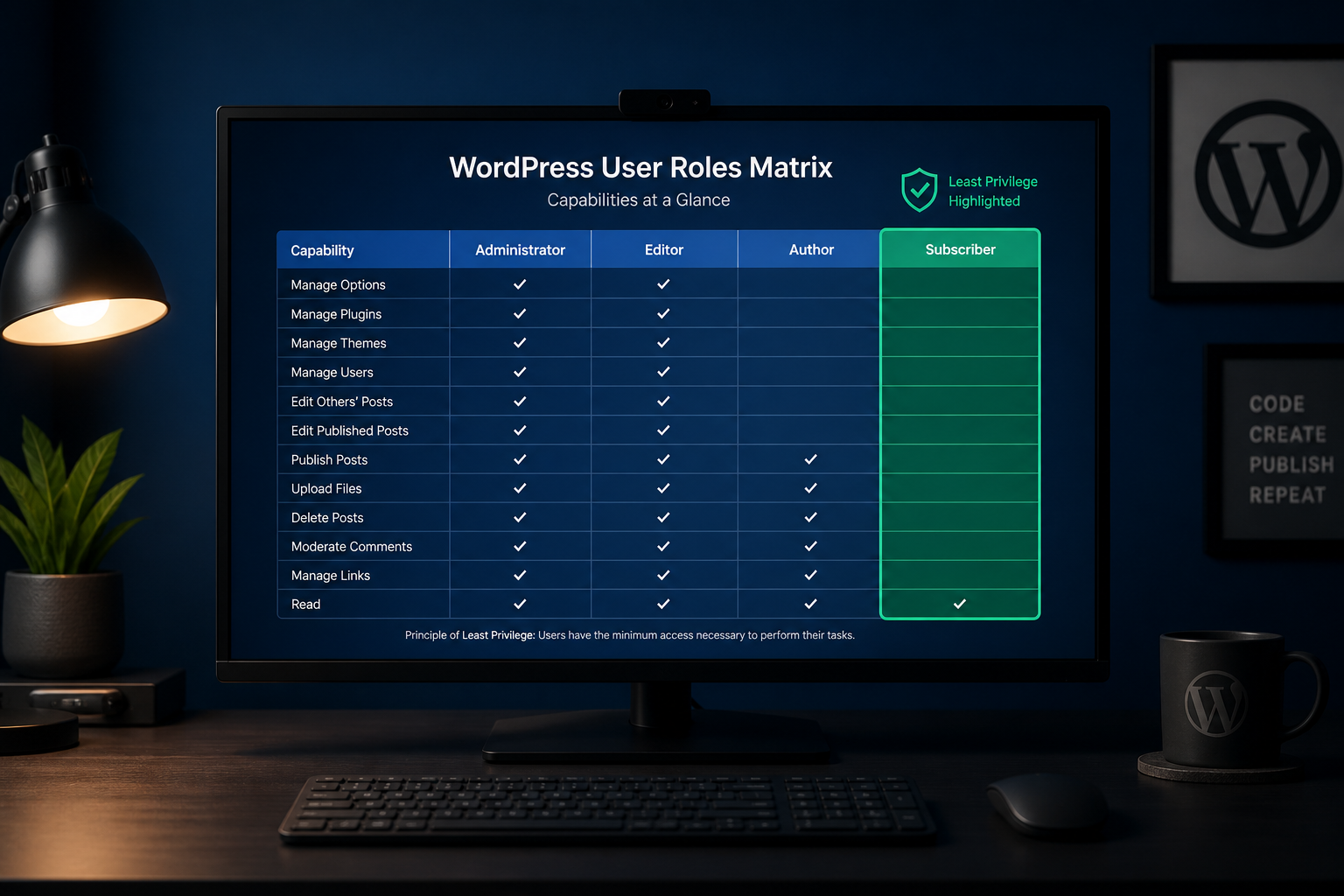
Every WordPress user account is a potential entry point. Least privilege means giving each person the lowest role that still lets them do their job. A site with six administrators where one person actually administers anything has six times the attack surface of a site with one admin and five editors.
This is one of the highest-value, lowest-effort security controls available. It takes thirty minutes and closes a gap that causes real compromises.
WordPress default roles
WordPress ships with five default roles, ranked by capability:
| Role | Can publish | Can edit others' content | Can install plugins | Can manage users | Can edit files |
|---|---|---|---|---|---|
| Subscriber | No | No | No | No | No |
| Contributor | Draft only | No | No | No | No |
| Author | Own posts | No | No | No | No |
| Editor | Yes | Yes | No | No | No |
| Administrator | Yes | Yes | Yes | Yes | Yes (if not disabled) |
Administrator is effectively server access. An admin can install plugins (arbitrary code), edit theme files (if `DISALLOW_FILE_EDIT` is not set), create new admin accounts, and export the database. Treat admin credentials accordingly.
Who should have which role
Administrator
Give this role to: One or two people who manage plugins, themes, updates, and user accounts. Maybe three on larger teams with clear ownership.
Not for: Content writers, marketing staff, clients who "just need to update the blog," contractors doing one task.
Editor
Give this role to: Content managers who publish and edit all posts but should not install plugins or manage users.
Risk note: An editor can inject malicious JavaScript into published content. Require 2FA for all editors — see secure WordPress admin login.
Author
Give this role to: Individual writers who publish their own posts but should not edit others' content or change site settings.
Contributor
Give this role to: Guest writers or staff who submit drafts for review. Cannot publish directly.
Subscriber
Give this role to: Front-end registered users (WooCommerce customers, membership site members). No admin access.
WooCommerce roles
WooCommerce adds two roles:
| Role | Capabilities |
|---|---|
| Customer | View orders, edit own account. No admin access. |
| Shop Manager | Manage products, orders, reports, coupons. Cannot install plugins or edit themes. |
Shop Manager is powerful. It can view customer data, process refunds, and modify products. Apply the same password and 2FA standards as administrators. Do not give Shop Manager to people who only need to view orders.
Full store role guidance: secure WooCommerce store checklist.
Custom roles
Plugins like Members, User Role Editor, and PublishPress Capabilities let you create custom roles with specific capabilities.
When custom roles make sense:
- A team member needs to manage WooCommerce products but not orders
- A client needs to edit one custom post type but nothing else
- An agency needs a "Developer" role that can manage plugins but not users
When they add complexity without value:
- Creating a custom role identical to Editor with a different name
- Granular permissions for a two-person team
Keep it simple unless a genuine business need requires granularity.
The user audit process
Run this quarterly — or immediately if you suspect compromise.
Step 1: List all accounts
WordPress admin → Users → All Users. Export or screenshot the list.
Step 2: Flag issues
| Red flag | Action |
|---|---|
| Unrecognized username | Investigate immediately — may be attacker-created |
| Administrator who should be Editor | Downgrade role |
| Account for someone who left | Remove or disable |
| Shared/generic account ("office@," "marketing@") | Split into individual accounts |
| Username is "admin" | Create new account, migrate content, delete old |
| Display name matches login name | Change login name to something non-obvious |
Step 3: Verify 2FA status
Every Editor and Administrator should have 2FA enabled. Check via your 2FA plugin's admin report.
Step 4: Check last login
Plugins like Solid Security and Wordfence log last login dates. Accounts inactive for 90+ days with elevated roles should be downgraded or removed.
Step 5: Document the result
Record who has what role and why. Future audits compare against this baseline.
Common mistakes
Too many administrators. The most common issue. Clients ask for admin because they think they need it. Most need Editor or Author.
Contractor accounts left active. A developer who built the site three years ago still has admin access. Remove contractor accounts when engagement ends.
Shared credentials. One admin account used by four people means you cannot audit who did what, and password rotation affects everyone. Individual accounts, always.
Client as permanent admin. Some agencies give clients admin by default. Consider a custom "Client" role that lets them edit content without installing plugins.
Ignoring WooCommerce Shop Manager. Store staff get admin because "they need to manage the store." Shop Manager exists for this purpose.
Least privilege checklist
| Task | Done? |
|---|---|
| Count administrators — justify each one | ☐ |
| Downgrade unnecessary admins to Editor or below | ☐ |
| Remove accounts for people who left | ☐ |
| Split shared accounts into individual users | ☐ |
| 2FA enabled for all Editor+ accounts | ☐ |
| Shop Manager (not Admin) for store staff | ☐ |
| Login usernames distinct from display names | ☐ |
| No unrecognized accounts | ☐ |
| Audit scheduled quarterly | ☐ |
Part of the full WordPress security hardening checklist.
Frequently asked questions
Can an Editor take over the site?
An editor can publish content containing malicious scripts, which is a serious risk. They cannot install plugins, create admin accounts, or edit theme files (with `DISALLOW_FILE_EDIT` enabled). Editor is significantly safer than Administrator, but not zero-risk — which is why 2FA matters for editors too.
Should I give my client Administrator access?
Only if they manage plugins, themes, and updates themselves. If they publish content, Editor is appropriate. If an agency maintains the site, the client rarely needs admin.
How do I remove a rogue administrator?
Log in as a different administrator, change the rogue account's role to Subscriber, then delete it. If you cannot log in, use phpMyAdmin or WP-CLI to change the role directly in the database. Regenerate security keys in wp-config.php to invalidate all sessions.
What about WordPress multisite?
Multisite adds Super Admin — above Administrator — with network-wide control. The same least-privilege principles apply, but at network scale. Super Admin should be limited to one or two people.
Does least privilege replace 2FA?
No. Least privilege reduces how many powerful accounts exist. 2FA protects each powerful account that remains. Use both.
Get a free 15-minute security check
Send your URL. I cannot audit your user accounts remotely, but I can check for exposed user enumeration and other public-facing signals that suggest weak access control.
User role audits are standard in WordPress security hardening projects — typically $300–$1,200.
August 30, 2026
How to Tell If Your WordPress Site Is...
August 30, 2026



