

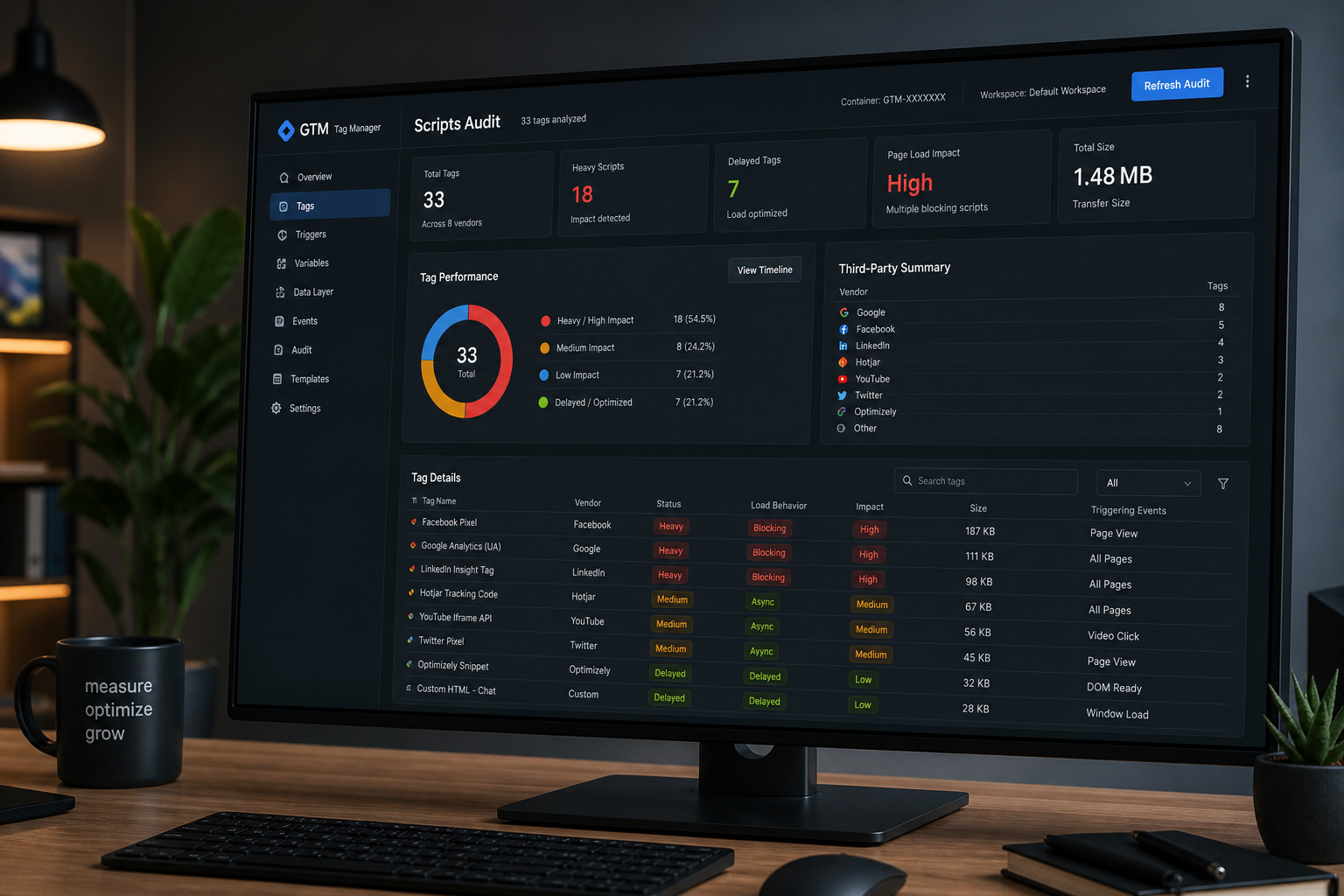
Third-party scripts slowing your website are one of the most common — and most ignored — performance problems. Google Tag Manager makes it easy to add pixels without developer review, so marketing teams accumulate analytics, ads, heatmaps, chat, A/B tests, and social widgets until the main thread never goes quiet. That shows up as bad Interaction to Next Paint, delayed LCP, and lab warnings you can't fix with image compression.
You probably need most of your tracking. The goal isn't zero third parties — it's knowing what loads, where, and what each tag costs.
Step 1: Inventory every third-party domain
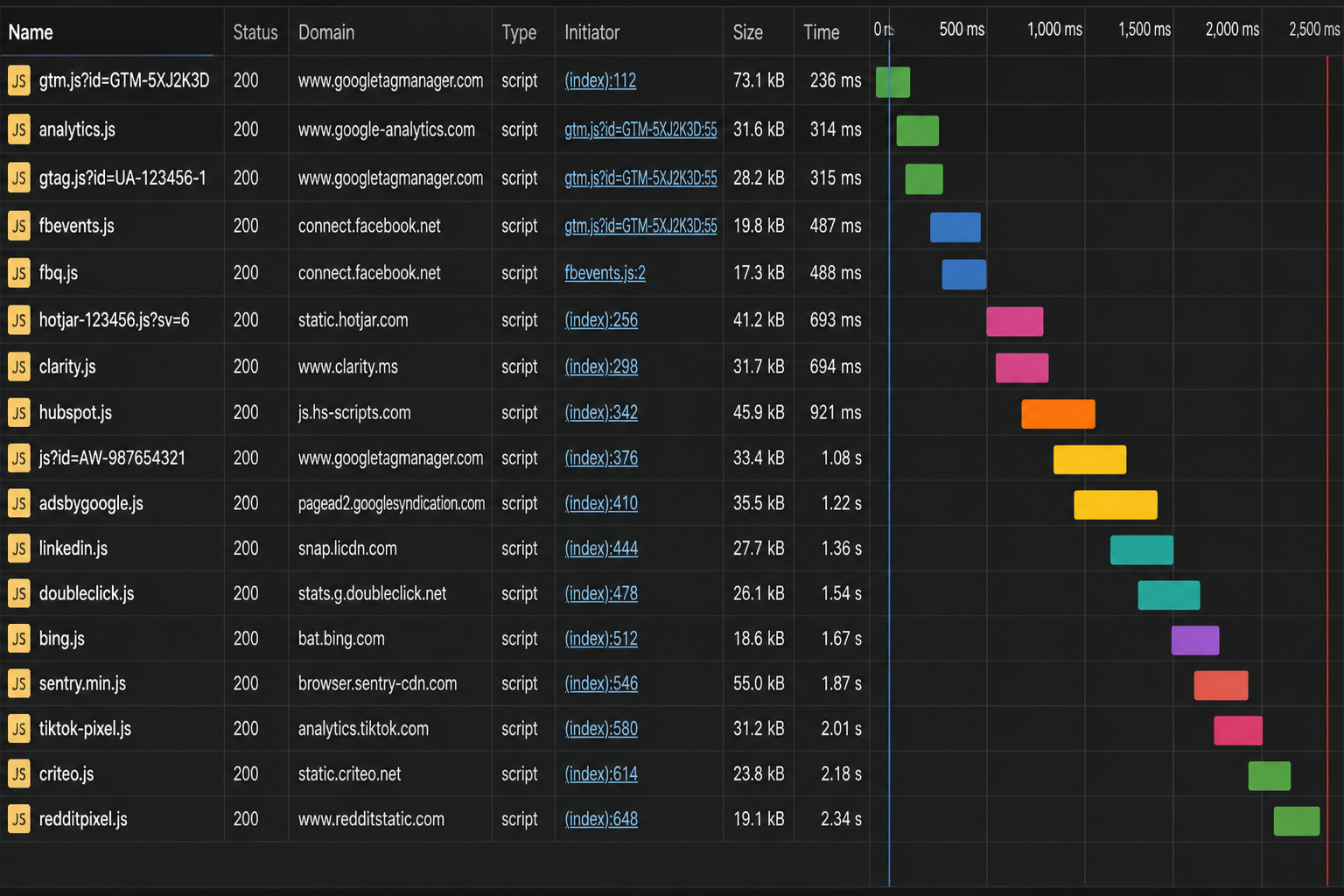
Open Chrome DevTools → Network → reload the page → sort by domain. Export or screenshot domains that aren't your site, CDN, or font provider.
Common third-party categories:
| Category | Examples | Typical pages |
|---|---|---|
| Analytics | GA4, GTM, Adobe Analytics | All pages |
| Advertising | Meta Pixel, Google Ads, LinkedIn Insight | All or landing only |
| Heatmaps/session replay | Hotjar, Microsoft Clarity, FullStory | All pages |
| Chat | Intercom, Drift, Tidio, HubSpot chat | All or sales pages |
| A/B testing | Optimizely, VWO, Google Optimize successors | Test pages |
| Social/embeds | Facebook SDK, Twitter widgets | Blog, footer |
| Reviews | Trustpilot, Yotpo | Product pages |
| Consent | Cookiebot, OneTrust | All (required) |
| CDN-hosted widgets | Calendly, Typeform embeds | Contact/booking |
Repeat inventory on homepage, landing page, product page, checkout — tag load often differs.
Step 2: Audit Google Tag Manager container
If GTM is your tag hub, use GTM Preview mode:
- Connect preview to your site URL
- Walk through key page types
- Record which tags fire on each event (Page View, DOM Ready, Window Loaded, clicks)
| GTM check | Action if failing |
|---|---|
| Tags firing on all pages when only needed on landing | Add page path triggers |
| Duplicate GA4 / duplicate Meta Pixel | Remove redundant tags |
| Tags paused but not deleted | Delete dead tags |
| Custom HTML tags injecting sync scripts | Rewrite async or move to server-side |
| 10+ tags on Window Loaded | Consolidate or delay |
| No consent mode integration | Configure Consent Mode v2 for EU traffic |
Document each tag: name, owner (marketing/sales/dev), business purpose, pages fired, last verified date.
Step 3: Measure performance cost
| Method | What it shows |
|---|---|
| Lighthouse → "Reduce JavaScript execution time" | Third-party CPU time breakdown |
| DevTools Performance trace | Long tasks attributed to script URLs |
| WebPageTest → Request chart | Third-party request count and bytes |
| Chrome Coverage tab | Unused JS from third parties |
| PSI field INP vs lab TBT | Whether users feel the script cost |
No single number captures "cost of Meta Pixel" — look for scripts appearing in top main-thread offenders consistently across runs.
Step 4: Classify tags — keep, delay, restrict, remove
| Decision | Criteria | Example |
|---|---|---|
| Keep as-is | Required on page; low main-thread cost | GA4 with async gtag on key pages only |
| Delay until interaction | Useful but not needed for first paint | Chat widget, heatmaps |
| Restrict by page | Only relevant on subset | Meta Pixel on landing pages, not blog |
| Server-side tagging | Pixel needed but client JS too heavy | Meta CAPI + server GTM |
| Remove | No owner, no recent use, duplicate | Old Optimize container, legacy Universal Analytics |
Delay strategies for WordPress
| Approach | Notes |
|---|---|
| WP Rocket / FlyingPress "delay JS" | Test checkout/forms after enable |
| Custom GTM loader on user scroll/interaction | Common pattern; verify tag completeness |
| Facade for chat (fake button until click) | Reduces initial load |
| Load pixels after consent only | Required in many jurisdictions anyway |
Never delay payment gateway scripts on checkout.
Step 5: Fix embeds and widgets
Non-GTM third parties load via theme settings, plugins, or raw embed codes.
| Source | Fix |
|---|---|
| Facebook pixel plugin + GTM pixel | Choose one implementation |
| Social feed plugin | Replace with static links or screenshot |
| Google Maps on contact page only | Don't load Maps API globally |
| Live chat plugin on all pages | Restrict to contact/pricing |
| Review carousel in footer site-wide | Load on product pages only |
Search WordPress theme files and plugin settings for `script src=`, `googletagmanager`, `facebook.net`, `hotjar`.
Step 6: Consent and performance together
Cookie consent banners often load additional scripts. Configure so:
- Non-essential tags wait for consent (Consent Mode)
- Consent banner itself doesn't cause CLS — use overlay, fixed position
- Consent platform script isn't duplicated in GTM and plugin
Legal requirements trump performance — optimize within compliance, don't strip required consent.
Third-party audit checklist
| ☐ | Task |
|---|---|
| ☐ | Network inventory on 4+ page types |
| ☐ | GTM Preview tag list exported |
| ☐ | Each tag has named owner |
| ☐ | Duplicates removed |
| ☐ | Dead tags deleted (not paused) |
| ☐ | Chat/heatmap delayed or restricted |
| ☐ | Checkout tested after any JS delay change |
| ☐ | Consent mode verified |
| ☐ | Before/after PSI or trace captured |
Server-side tagging (when client-side isn't enough)
For ad-heavy ecommerce, server-side GTM (sGTM) moves pixel firing off the browser. Setup cost is higher — hosting for sGTM container, DNS configuration — but client main-thread cost drops.
Worth evaluating when:
- Meta + Google Ads + TikTok + Pinterest all fire on product pages
- INP remains Poor after delay strategies
- Marketing requires full pixel fidelity
Not required for brochure sites with GA4 + one ads pixel.
Organizational fix: tag governance
Performance regressions return when anyone can add GTM tags without review.
Minimal governance:
- Named owner for GTM container
- New tag requires: purpose, pages, performance note
- Quarterly tag cleanup in calendar
- Staging preview before publishing container changes
When to escalate to full audit
Script audit alone may not explain high TTFB or page builder bloat. Combine with website performance audit when INP stays Poor after tag cleanup or stakeholders need written documentation.
Frequently asked questions
Will removing GTM break my analytics?
Removing GTM removes tags inside it. Migrate needed tags first or replace with direct async implementations.
Is Google Analytics a third-party script problem?
GA4 adds JavaScript cost but is usually manageable when loaded once, async, and not duplicated. Duplication is the common mistake.
Can I block third parties with CSP?
Content Security Policy can block unauthorized scripts — advanced, requires dev maintenance. Tag governance is step one.
Does async always mean safe for performance?
Async scripts still execute on main thread. They don't block HTML parse as long, but INP still suffers if many async scripts compete at once.
Who should own the GTM audit — marketing or dev?
Marketing owns tag purpose; dev or performance specialist owns implementation impact. Both in the room.
Book a free 15-minute site audit
Suspect GTM or chat widgets are killing mobile speed but don't know which tag? Book a free 15-minute audit. I'll sample your third-party load and tell you whether tag cleanup alone will help or you need a full website performance audit.
August 5, 2026
Ecommerce Website Performance Audit

August 5, 2026



