

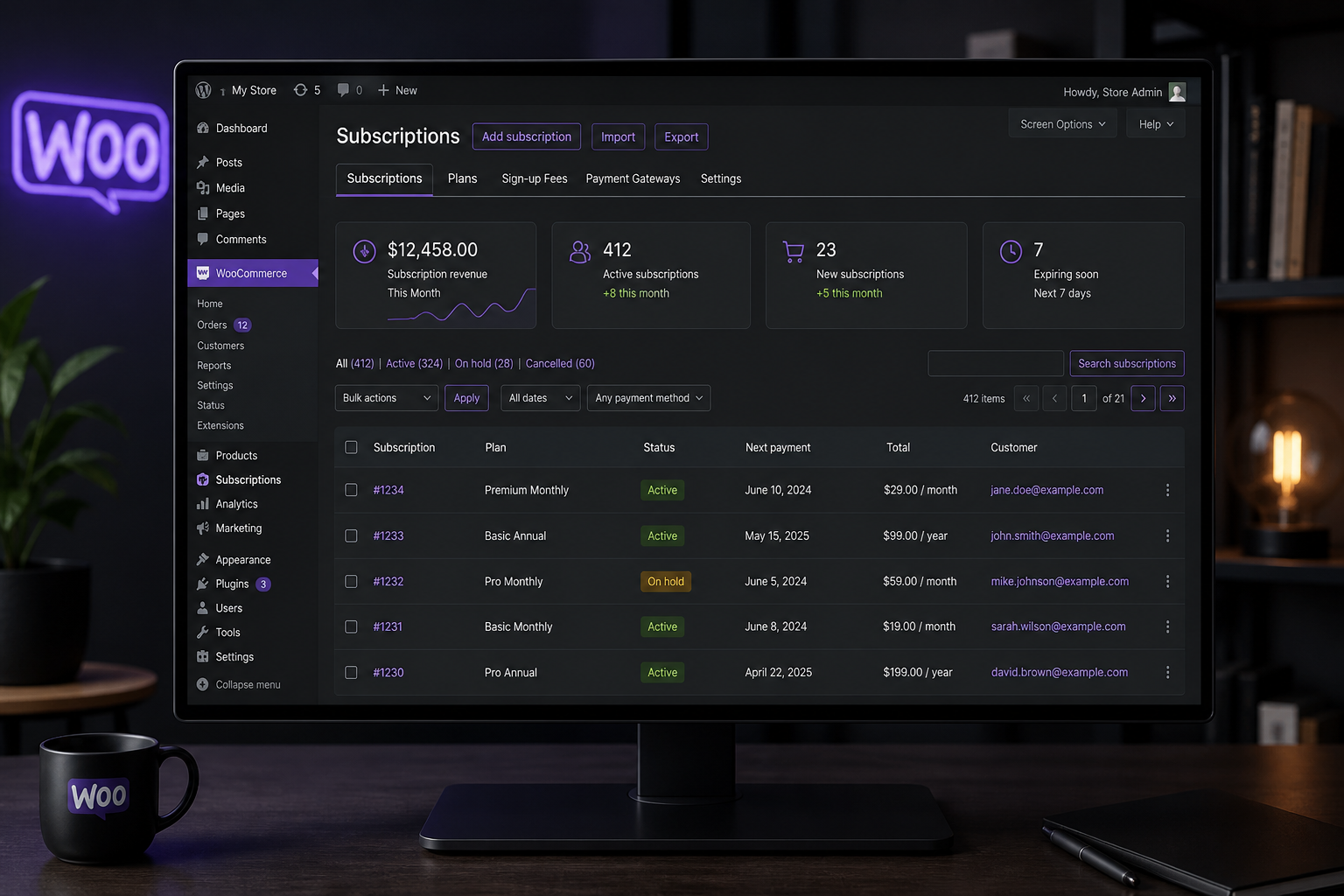
WooCommerce subscriptions setup requires the WooCommerce Subscriptions extension ($239/year from WooCommerce.com), a payment gateway that supports recurring charges (Stripe recommended), and careful configuration of billing intervals, renewal logic, and failed payment recovery. Subscription stores fail silently when renewal payments break — customers churn without ever contacting support.
One-time purchase stores have one failure point: checkout. Subscription stores have recurring failure points: initial signup, first renewal, payment method expiry, card declines, and cancellation handling. Setup is half the work. The other half is dunning — what happens when payments fail.
Prerequisites
Before installing WooCommerce Subscriptions:
- WooCommerce core installed and configured
- Payment gateway with tokenization — Stripe, PayPal, or Square (Stripe is the most reliable for subscriptions)
- SSL certificate active on the entire site
- Action Scheduler functioning (WooCommerce → Status → Scheduled Actions — no stuck queues)
- Reliable hosting — shared hosting with cron disabled will miss renewal charges
Step 1: Install and activate
- Purchase WooCommerce Subscriptions from WooCommerce.com
- Download and install via Plugins → Add New → Upload
- Activate and enter your license key
- Verify "Subscriptions" appears under WooCommerce → Settings
Step 2: Configure global subscription settings
Navigate to WooCommerce → Settings → Subscriptions:
| Setting | Recommendation |
|---|---|
| Accept manual renewals | Enable if you accept check/PO for B2B subscriptions |
| Turn off automatic payments | Leave disabled (customers expect auto-renewal) |
| Roles granted to subscribers | Set if subscriptions unlock content or wholesale pricing |
| Renewal reminder emails | Enable — send 3–7 days before renewal |
| Retry failed payments | Enable with 3–4 retry attempts over 7–14 days |
| Cancel subscription on failed payment | Disable until retries are exhausted |
The failed payment retry settings are the most important configuration in the entire plugin. Without retries, a single expired card silently cancels a subscription.
Step 3: Create a subscription product
- Products → Add New
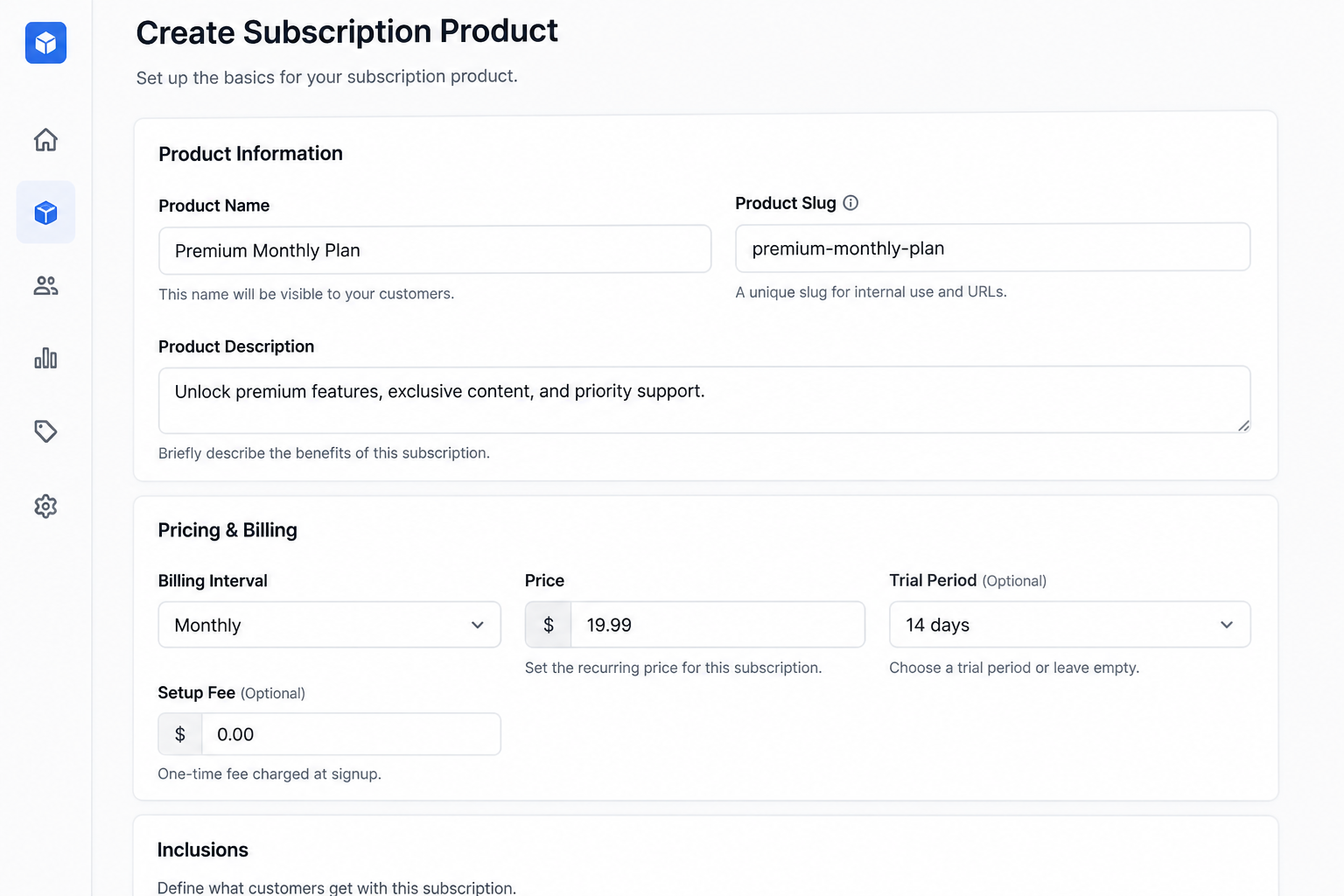
- Product data dropdown: Simple subscription (or Variable subscription for tiered plans)
- Configure the subscription terms:
| Field | Example |
|---|---|
| Subscription price | $29.00 |
| Billing interval | Every 1 month |
| Sign-up fee | $0 (or one-time setup fee) |
| Free trial | 14 days (optional) |
| Subscription length | Never expires (or 12 billing cycles) |
- Set product description, image, and category
- Publish
Variable subscriptions
For tiered plans (Basic/Pro/Enterprise):
- Product data: Variable subscription
- Create a "Plan" attribute with values: Basic, Pro, Enterprise
- Generate variations
- Set different subscription prices per variation
Step 4: Configure payment gateway for recurring charges
Stripe is the recommended gateway for subscriptions:
- Install WooCommerce Stripe Payment Gateway
- Connect your Stripe account
- Enable "Saved Cards" / tokenization
- Test with Stripe test mode cards:
– Success: `4242 4242 4242 4242`
– Decline: `4000 0000 0000 0002`
– Requires authentication: `4000 0025 0000 3155`
Verify that Stripe creates a Customer and Payment Method object for each subscription — not just a one-time charge.
See the full payment gateway integration guide for gateway-specific setup.
Step 5: Test the subscription lifecycle
Run through the entire lifecycle in test mode before going live:
- Purchase — complete checkout with a test card
- Confirm subscription created — WooCommerce → Subscriptions → verify status "Active"
- Verify initial payment — Stripe dashboard shows charge
- Simulate renewal — WooCommerce → Subscriptions → select subscription → "Process renewal" (or wait for scheduled renewal)
- Simulate failed payment — use decline test card on renewal
- Verify retry logic — confirm retry emails send and retry attempts occur
- Test cancellation — customer cancels via My Account → Subscriptions
- Test reactivation — if supported, reactivate a cancelled subscription
Do not skip step 4. Most subscription bugs appear at first renewal, not initial signup.
Step 6: Customer self-service
Enable customer subscription management:
- WooCommerce → Settings → Accounts → enable "Customers can manage subscriptions from My Account"
- Customers can view subscription status, update payment method, change address, and cancel
- Reducing support tickets for "how do I cancel" pays for itself immediately
Subscription-specific email configuration
WooCommerce Subscriptions adds email types beyond standard WooCommerce:
| When it sends | Action needed | |
|---|---|---|
| New renewal order | Each successful renewal | Verify order confirmation content |
| Subscription cancelled | Customer or admin cancels | Include win-back messaging |
| Subscription expired | Fixed-length subscription ends | Offer re-subscription link |
| Payment retry | Failed payment retry attempt | Clear call-to-action to update card |
| Payment failed (final) | All retries exhausted | Include reactivation instructions |
Customize these in WooCommerce → Settings → Emails. Default templates are functional but generic.
Common subscription setup mistakes
| Mistake | Consequence |
|---|---|
| No failed payment retries configured | Silent churn on every expired card |
| Shared hosting with broken WP-Cron | Renewals never process |
| Payment gateway without tokenization | Cannot charge renewals automatically |
| No test of renewal cycle before launch | Bugs discovered by real customers |
| Subscription products without clear cancellation policy | Chargebacks and support load |
| Free trial without requiring payment method | Trial abuse with no conversion path |
Subscription + other WooCommerce features
Subscriptions + coupons
Coupons can apply to initial subscription, renewals, or sign-up fees independently. Configure in the coupon's "Usage limits" and subscription-specific fields.
Subscriptions + B2B wholesale
Wholesale customers can have subscription-based pricing tiers. Requires coordination between Wholesale Suite/B2BKing and WooCommerce Subscriptions role settings.
Subscriptions + membership content
Combine with WooCommerce Memberships to gate content behind active subscriptions. Membership access should sync with subscription status — active, on-hold, cancelled.
What subscription setup costs
| Scope | Estimate (USD) |
|---|---|
| Plugin license (WooCommerce Subscriptions) | $239/year |
| Basic subscription product setup (1–3 plans) | $1,000–$2,500 |
| Multi-tier variable subscriptions + custom emails | $2,500–$5,000 |
| Subscriptions + membership content gating | $4,000–$8,000 |
| Full subscription store with dunning + analytics | $6,000–$12,000+ |
Development estimates exclude the plugin license and hosting. Full subscription store builds typically fall in the $6,000–$12,000+ range as part of a broader WooCommerce development project.
FAQs
Does WooCommerce Subscriptions work with any payment gateway?
No. The gateway must support tokenization (saved payment methods) and recurring charges. Stripe, PayPal, and Square work. Bank transfer and check do not support automatic renewals (manual renewal only).
What happens when a customer's card expires?
With retry logic enabled, WooCommerce Subscriptions attempts the renewal, fails, sends a "update your payment method" email, and retries over several days. Without retries, the subscription moves to "on-hold" and eventually "cancelled" — often without the customer noticing.
Can customers pause subscriptions?
Not natively. WooCommerce Subscriptions supports suspend/resume via admin or extensions. If pause is a business requirement, configure it during setup — not as an afterthought.
How do I handle subscription sales tax?
Tax applies to each renewal charge based on the customer's billing address at time of renewal. Configure tax rates in WooCommerce → Settings → Tax. For US sales tax, use TaxJar or Avalara integration for automated rate calculation.
Is WooCommerce Subscriptions the only option?
Alternatives include YITH WooCommerce Subscription (lower cost), SUMO Subscriptions, and Paid Memberships Pro (membership-focused). WooCommerce Subscriptions is the most maintained and compatible with the WooCommerce ecosystem. For most stores, it is worth the license cost.
Next step
If you are setting up subscriptions and want to avoid the renewal bugs that cost stores 10–20% of recurring revenue, start with a scoped review of your payment and retry configuration.
Book a free 15-minute WooCommerce audit →
For product type selection and payment gateway setup, see the related guides.

September 8, 2026
WooCommerce Speed Optimization: A Practical Guide
September 8, 2026



