

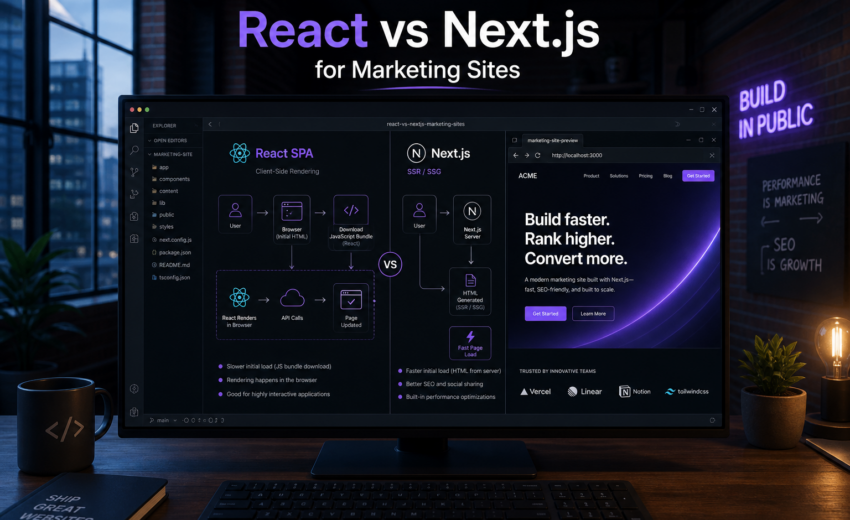
React vs Next.js for Marketing Sites
If the site’s job is to be found in search and convert visitors, build it in Next.js. That’s the recommendation, and it’s not close.
For applications behind a login — dashboards, internal tools, anything where search visibility is irrelevant — plain React is a legitimate choice. Though even there, Next.js is often the better default, for reasons that have nothing to do with SEO.
The rest of this explains why, and where the exceptions genuinely are, because “always use the bigger framework” is bad advice and I don’t want to give it.
The comparison isn’t apples to apples
Worth clearing up first: React and Next.js aren’t competitors in the way the question implies. React is a library for building user interfaces. Next.js is a framework built on React that adds routing, rendering strategies, data fetching conventions, build tooling, and a deployment model.
So the real comparison is between Next.js and React assembled yourself — React plus a router, plus a build tool like Vite, plus your own decisions about rendering, code splitting, data fetching, and metadata.
That framing matters, because the question isn’t “which is more powerful.” You can build anything in either. The question is how much infrastructure you want to own, and whether the parts Next.js gives you are parts you need.
For a marketing site, they are.
The rendering problem
Here’s the core issue, stated plainly.
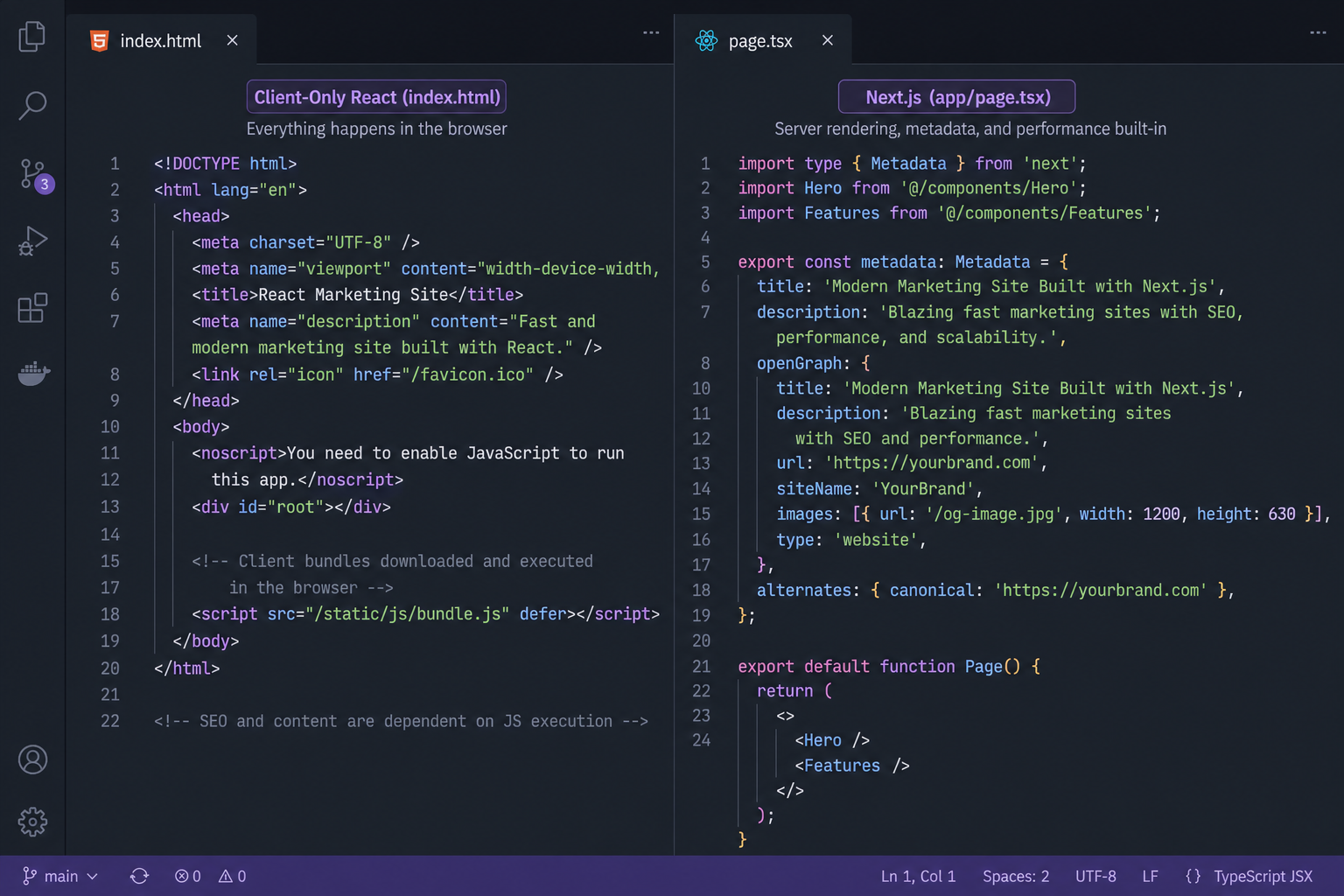
A standard React app built with Vite or Create React App ships an HTML file that is essentially empty:
<div id="root"></div>
<script src="/assets/index.js"></script>
Everything a visitor sees is constructed by JavaScript after that file loads. The browser downloads the HTML, downloads the bundle, parses it, executes it, probably makes an API call, waits, and then renders your headline.
Next.js sends the finished HTML. The headline, the copy, the links, the structured data — present in the initial response, before any JavaScript runs.
For an app behind a login, the first approach is fine. Users are already committed; a spinner for 400ms is acceptable. For a marketing site, it creates three problems.
Search engines. Google does execute JavaScript, so client-rendered content usually does get indexed eventually. “Usually” and “eventually” are the operative words — rendering happens in a deferred second pass, and it’s less reliable for large sites, less reliable on slow pages, and considerably less reliable outside Google. Bing, social scrapers, and the newer AI crawlers vary in what they’ll execute. If organic traffic is how the business finds customers, building on “the crawler will probably run our JavaScript” is a risk taken for no benefit.
Social sharing. Link preview scrapers on Slack, LinkedIn, Facebook, and iMessage generally don’t execute JavaScript at all. They read the HTML, find no Open Graph tags because those are injected client-side, and show a bare URL. Every share of your content loses its image, title, and description.
Perceived speed. Largest Contentful Paint in a client-rendered app can’t happen until the JavaScript has downloaded, parsed, executed, and fetched data. On a fast connection this is a few hundred milliseconds. On a mid-range phone on mobile data — which is a large share of real traffic — it’s seconds of blank screen. That’s both a Core Web Vitals problem and a conversion problem.
Next.js solves all three by rendering on the server. That’s the headline difference, and for a marketing site it’s usually enough to decide the question on its own.
What else Next.js gives you
Rendering is the biggest reason, but a few others matter in practice.
Per-route rendering strategy. Your homepage can be static, your blog can use incremental static regeneration against a CMS, and your pricing calculator can render per request. One application, three strategies. In a hand-assembled React setup you’d be running a separate prerender step or a third-party service to approximate this.
Metadata as a first-class concern. generateMetadata produces real tags on the server: titles, descriptions, canonicals, Open Graph, Twitter cards. In client-side React you’re managing this with a helmet library that injects tags after load, which works for users and doesn’t work for scrapers.
Image optimization. next/image handles responsive sizing, modern formats, lazy loading, and layout-shift prevention. Marketing sites are image-heavy by nature, and doing this manually is real work you’d otherwise be doing.
Font handling. next/font self-hosts and preloads web fonts, removing a third-party request from the critical path and eliminating the font-swap flash. Small feature, disproportionate effect on how fast a site feels.
Server components ship less JavaScript. In the App Router, components render on the server by default and send no JavaScript to the browser. On a marketing site where most of the page is static content, this can mean a fraction of the bundle a client-rendered equivalent would ship — which shows up directly in interaction responsiveness.
Routing you don’t configure. File-based routing means adding app/pricing/page.tsx creates /pricing. It’s a small thing per route and a meaningful thing across a 40-page site.
Sitemaps and robots from code. Generated from what’s actually published, so they can’t drift out of sync.
Individually, none of these is decisive. Together they’re most of what an SEO-focused build needs, and you’d be assembling every one of them yourself otherwise.
What Next.js costs you
It isn’t free, and pretending otherwise leads to bad decisions.
More to learn. Server components, client components, the boundary between them, caching behavior, and the different rendering modes are genuinely more concept than “React renders in the browser.” Teams new to it lose time to subtle mistakes — a 'use client' too high in the tree, a cookies() call that makes a whole layout dynamic.
A Node runtime to deploy. A Vite React app is static files; any CDN or S3 bucket will serve it. Next.js needs a Node environment unless you’re fully static exporting. Vercel makes this a non-issue, and self-hosting is well documented, but it’s a real operational difference.
Framework opinions. File structure, routing, and data fetching follow Next.js conventions. Usually a benefit. Occasionally a fight, when your requirements don’t match the assumptions.
Version churn. Next.js moves quickly. The App Router was a significant shift, caching defaults have changed between major versions, and upgrades sometimes require real work. A plain React app is a calmer place to sit for three years.
Longer builds at scale. Statically generating thousands of pages takes time. Manageable with ISR and on-demand revalidation, but it’s a thing you have to think about.
Side by side
| Plain React (Vite/CRA) | Next.js | |
|---|---|---|
| Initial HTML | Empty shell | Fully rendered |
| SEO for public content | Depends on crawler JS execution | Reliable |
| Social link previews | Broken without extra tooling | Works |
| Routing | Add and configure a router | Built in, file-based |
| Metadata | Client-injected via a helmet library | Server-rendered API |
| Images and fonts | Manual or third-party | Built in |
| Hosting | Any static host | Node runtime, or static export |
| Learning curve | Lower | Higher |
| Best fit | Authenticated apps, embedded widgets | Marketing, content, commerce |
So: which one
Marketing site, content site, or anything commercial → Next.js. If the site exists to be found and to convert, the rendering advantage alone settles it. Every additional feature is a bonus.
SaaS marketing site plus a separate app → Next.js for the marketing site. These are usually two applications anyway. The public site needs SEO; the app behind the login doesn’t. Splitting them lets each be what it should be.
Ecommerce → Next.js. Product pages need to be indexed. Speed maps directly to conversion. This isn’t a close call either.
Internal dashboard, admin panel, or authenticated app → plain React is genuinely fine. No SEO requirement, no social sharing, and users tolerate an initial load. A Vite React app with a client router is simpler to build, simpler to deploy, and simpler to reason about. That said, Next.js still gives you routing, code splitting, and a clean way to add server-side data access, so choosing it here isn’t wrong — it’s just no longer obvious. This is where a straight React development engagement makes sense.
An embedded widget or component library → plain React. If you’re shipping something that mounts inside someone else’s page, Next.js isn’t the right shape at all.
A five-page brochure site with no app-like behavior → possibly neither. If there’s no interactivity beyond a contact form and no team wanting a component-based workflow, WordPress or a static site generator may serve you better and cost less to maintain. I’d rather say that than sell you a React build you don’t need.
The migration question
If you already have a client-rendered React site and it isn’t ranking, the honest answer is that this is usually fixable without a rewrite.
Next.js has an incremental adoption path, and the App Router coexists with existing React code. In practice, most of these migrations are mechanical: routes move to the file system, data fetching moves to server components, metadata moves to generateMetadata. The components themselves largely survive.
What determines whether it goes well isn’t the framework work. It’s whether the URL structure is preserved and the redirects are right — the same thing that determines every migration. Next.js SEO optimization covers the specifics.
If your content lives in WordPress and you want the React front end without changing how your team publishes, that’s headless WordPress development, which is Next.js with WordPress as the content source.
Frequently asked questions
Can’t I just add server-side rendering to my React app?
You can. You’d be adding a Node server, a rendering pipeline, route-level data loading, code splitting, and a metadata solution — which is a fair description of building Next.js. React Router’s framework mode and TanStack Start are legitimate alternatives that do this for you. Assembling it from scratch rarely is.
Does Google index client-side React or not?
It does, in a second rendering pass, most of the time. The failure modes are the problem: large sites where rendering budget runs short, pages that fail on a slow API call, and non-Google crawlers that don’t execute JavaScript at all. It works well enough that people ship it, and poorly enough that it’s a bad bet for a business.
Is Next.js overkill for a small site?
For a five-page site with a contact form, arguably yes — but the overhead is small and static export gives you plain files on any host. The real question is whether you need React at all. If the answer is “we want components and a design system,” Next.js is a fine place to put them. If the answer is “we just need pages,” consider WordPress.
What about Astro or Gatsby?
Astro is a strong option for content-heavy sites with little interactivity — it ships even less JavaScript than Next.js by default. Worth considering for a documentation site or a blog. Gatsby I’d avoid for new projects; its momentum has gone. If your site has meaningful interactive functionality alongside the content, Next.js is the safer general-purpose choice.
Do I need Vercel to run Next.js?
No. Vercel is the smoothest path and the features land there first, but Next.js self-hosts on any Node environment, in Docker, and on other platforms. Budget a little more setup work off Vercel, particularly around ISR and image optimization.
Will switching to Next.js improve my rankings?
It removes a technical obstacle. If your content was being indexed inconsistently or your Core Web Vitals were failing, fixing that helps. If your content isn’t competitive for the queries you want, faster rendering won’t change that. Framework choice is a floor, not a ceiling.
Talk through your build
Tell me what the site needs to do, who maintains it, and whether search traffic is part of the plan. I’ll give you a straight recommendation, including the one where you don’t need React at all.
Most builds I take on are Next.js development projects, because most sites that come to me depend on being found. When it’s an application rather than a site, React development is the right scope and I’ll say so.

August 14, 2026
Next.js vs WordPress: An Honest Comparison for 2026

August 14, 2026



